Deposit Policy (For Specific Rate)
Overview
The Deposit Policy feature allows you to define the deposit amount required for a specific rate. This deposit requirement can be configured directly under the rate, allowing you to specify how the deposit should be calculated and the value that should be collected when a reservation is made using that rate.
You can configure the deposit based on the number of nights, percentage, reservation total, or a fixed amount, depending on your property's requirements.
How to Configure a Deposit Policy for a Specific Rate
- Go to Setup > Rates.
- Open the specific rate for which you want to configure the deposit policy.
- Enable Deposit Require and select Yes.
- Select the required Deposit Type.
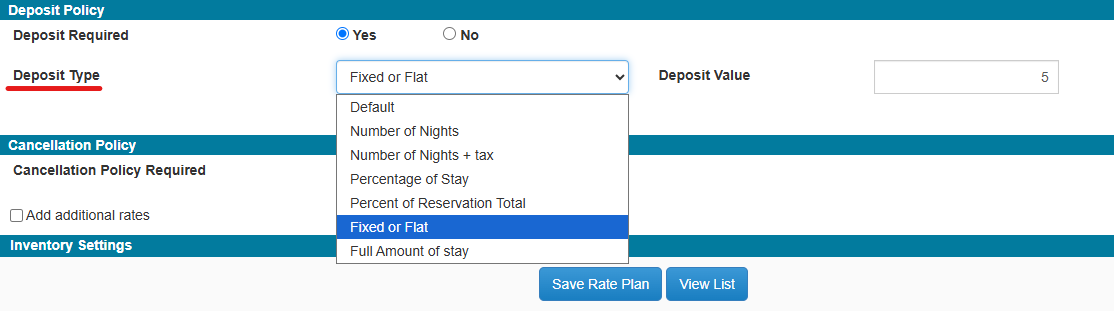
The available deposit types are:
- Default – Uses the property's default deposit policy.
- Number of Nights – Calculates the deposit based on the specified number of nights.
- Number of Nights + Tax – Calculates the deposit based on the specified number of nights, including tax.
- Percentage of Stay – Requires a specified percentage of the total stay amount as the deposit.
- Percent of Reservation Total – Requires a specified percentage of the total reservation amount as the deposit.
- Fixed or Flat – Requires a fixed deposit amount.
- Full Amount of Stay – Requires the full stay amount as the deposit.
Once select the Deposit Type, enter the required amount or value in the Deposit Value field.

Apply a Different Deposit for a Specific Season
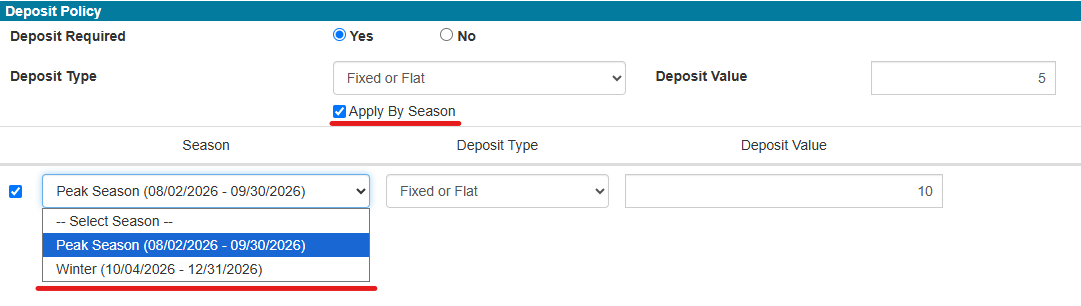
If a different deposit value needs to be applied to a specific season for the selected rate, enable the Apply by Season option under the Deposit Policy settings.
Once enabled, the seasons created under Seasons and Holidays Definitions will be available for selection.
- Select the required Season.
- Select the appropriate Deposit Type.
- Enter the required deposit amount or value in the Deposit Value field.
- Save the changes.
This allows you to configure a separate deposit requirement for a specific season while maintaining the regular deposit policy for the rate.
Was this article helpful?
That’s Great!
Thank you for your feedback
Sorry! We couldn't be helpful
Thank you for your feedback
Feedback sent
We appreciate your effort and will try to fix the article