Cancellation Policy (For Specific Rate)
Overview
The Cancellation Policy feature allows you to assign a specific cancellation policy to a rate. This policy determines the cancellation terms that will apply to reservations made using that rate.
Cancellation policies can be configured for the entire rate or, if required, a different cancellation policy can be assigned to a specific season.
How to Configure a Cancellation Policy for a Specific Rate
- Go to Setup > Rates.
- Open the specific rate for which you want to configure the cancellation policy.
- Enable Cancellation Policy Required.

- Once enabled, the cancellation policies created under Setup > Policies will be available for selection.
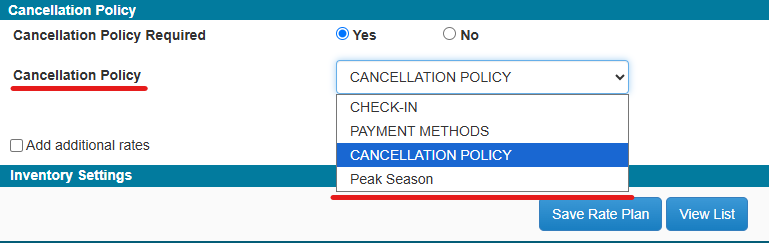
- Select the required Cancellation Policy.
- Click Save.
The selected cancellation policy will apply to reservations made using this rate. If the guest cancels the reservation, the applicable cancellation terms from the selected policy will be used.
Apply a Different Cancellation Policy by Season
If a different cancellation policy needs to be applied for a specific season under the selected rate, enable the Apply by Season option.
- Select the required season.
- Select the cancellation policy that should apply to that season.
- Save the changes.
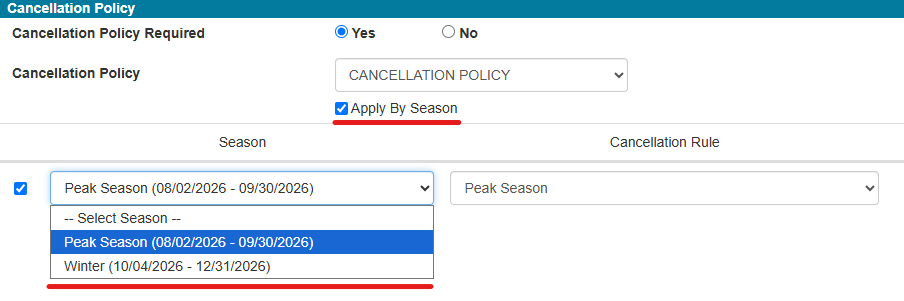
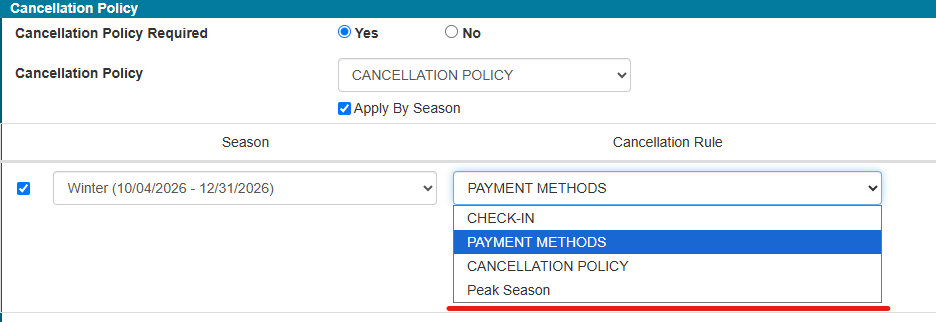
The selected seasonal cancellation policy will apply to reservations made using that rate during the specified season.
Display Cancellation Policy in Reservation Letters
To include the cancellation policy in a reservation letter, the cancellation policy merge tag must be added to the letter.
If the required reservation letter does not currently contain the cancellation policy:
- Go to the required Reservation Letter.
- Open the letter where you want the cancellation policy to appear.
- In the Merge Tags, locate the Rate section.
- Add the Cancellation Policy merge tag to the letter.
- Save the changes.
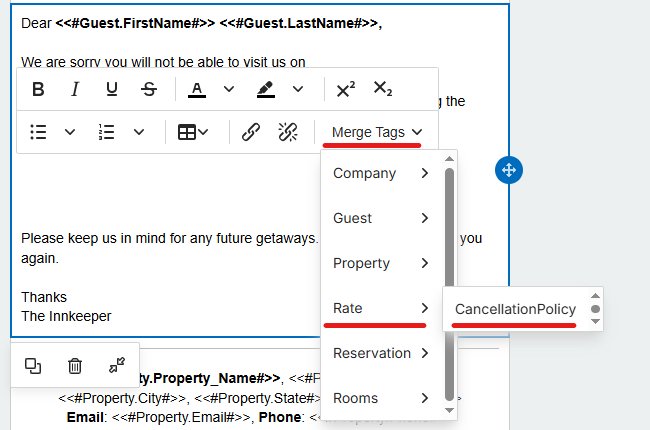
Once the merge tag is added, the cancellation policy assigned to the rate will be automatically included in the reservation letter sent to the guest.
Was this article helpful?
That’s Great!
Thank you for your feedback
Sorry! We couldn't be helpful
Thank you for your feedback
Feedback sent
We appreciate your effort and will try to fix the article