Issue Description
While creating or editing a Group Booking, users may face an issue where they are unable to add a new room block.
The room selection field appears as an empty/blank cell, preventing the user from selecting a room type.

Cause
This is a known system issue, and GraceSoft is already aware of it.
The issue occurs intermittently due to backend optimization constraints during room type loading.
Temporary Workaround
Until the issue is permanently fixed, please follow the steps below to proceed with the group booking:
Open the Group Booking screen.
When the room selection appears empty:
Select Room Type = “All Room Types”.
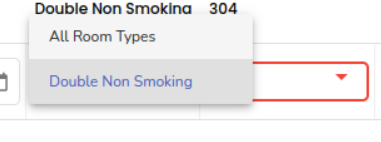
After selecting All Room Types, try selecting the required room again.
If the room still does not appear:
Repeat the above steps (select All Room Types → reselect the room).
After a few attempts, the room type should become selectable.
Once selectable, proceed with saving the group block as usual.
⚠️ This may take a few retries, but the system will eventually allow the room selection.
Was this article helpful?
That’s Great!
Thank you for your feedback
Sorry! We couldn't be helpful
Thank you for your feedback
Feedback sent
We appreciate your effort and will try to fix the article