Booking.com Configuration Options in EasyInnKeeping
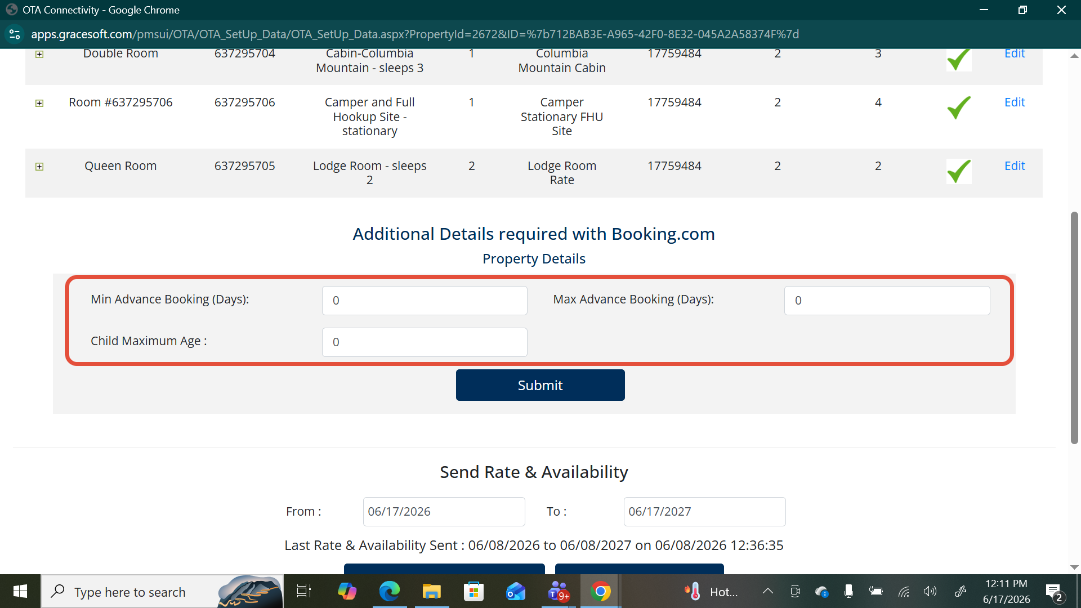
Advance Booking Restrictions
EasyInnKeeping allows you to configure booking lead-time restrictions for reservations received through Booking.com. These settings help control how far in advance guests can make reservations.
Goto Setup -> OTA Settings -> OTA Connectivity -> Booking.com
Minimum Advance Booking Days
The Min Advance Booking setting restricts guests from making reservations within a specified number of days before arrival.
Example:
If the value is set to 3 days, guests cannot book a room for arrival within the next 3 days.
Reservations can only be made for dates that are at least 3 days away.
Maximum Advance Booking Days
The Max Advance Booking setting restricts guests from making reservations beyond a specified number of days in the future.
Example:
If the value is set to 180 days, guests can only make reservations up to 180 days from the current date.
Any dates beyond 180 days will not be available for booking.
Child Maximum Age
The Child Maximum Age setting is used to categorize guests received from Booking.com as either children or adults within EasyInnKeeping.
How It Works
When a reservation is received from Booking.com, EasyInnKeeping evaluates the guest ages based on the configured Child Maximum Age value.
Example:
If Child Maximum Age = 5
Guests aged 0–5 years will be categorized as Children.
Guests aged above 5 years will be categorized as Adults.
Important Note
This setting is used only for internal reservation processing and guest categorization within EasyInnKeeping.
No data is pushed back to Booking.com.
To ensure consistent occupancy and guest count calculations, the same age rule must be configured separately within your Booking.com account.
Was this article helpful?
That’s Great!
Thank you for your feedback
Sorry! We couldn't be helpful
Thank you for your feedback
Feedback sent
We appreciate your effort and will try to fix the article