Convert a Regular Reservation to a Shared Reservation
- Go to the Reservation List.
- Open the Regular Reservation that you want to convert.
- At the top of the reservation page, locate the Regular drop-down and change it to Shared.
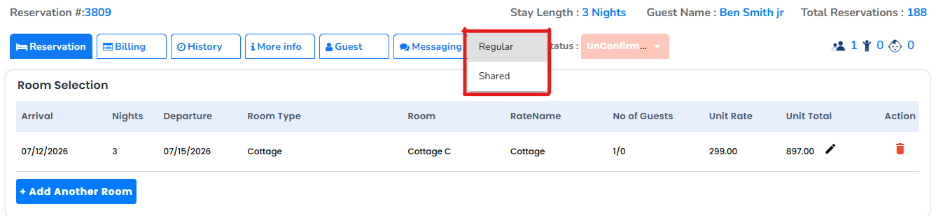
Additional fields will appear to add another guest.
Enter the required details for the additional guest.

Click Save to update the reservation.
Click the Guest Name drop-down next to the reservation type.
- The drop-down will display:
- The original guest from the regular reservation.
- The newly added shared guest.
Verify in the Reservation List
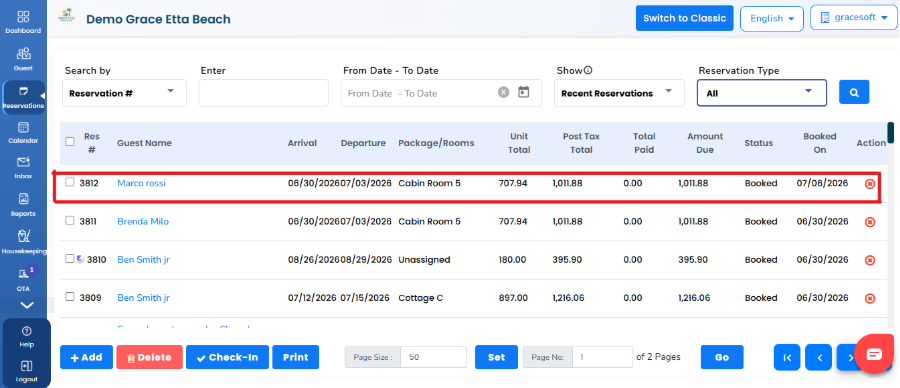
- Return to the Reservation List.
- Set the Reservation Type filter to All.
- The newly added shared guest will also be displayed on the reservation list.
Convert a Regular Reservation to a Group Reservation
- Go to the Reservation List.
- Open the Regular Reservation that you want to convert.
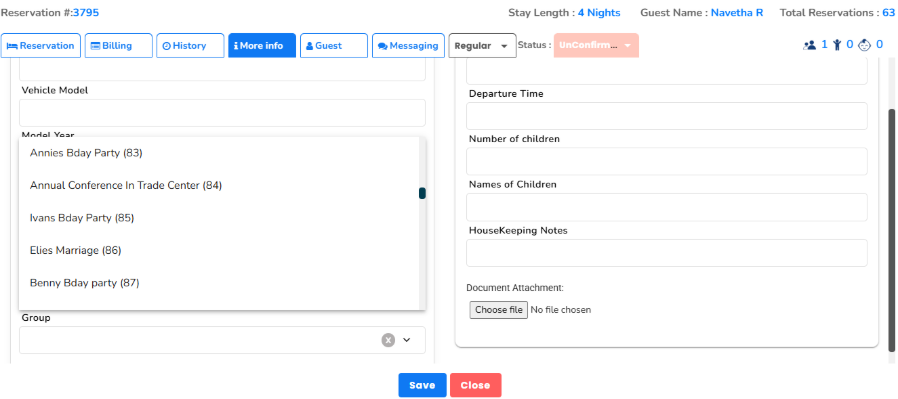
- Click the More Info tab at the top of the reservation page.
- In the Additional Information section, click the Group drop-down and select the required Group Name.
- Click Save to update the reservation.
Result
The regular reservation will be converted to the selected Group Reservation and associated with that group.
Was this article helpful?
That’s Great!
Thank you for your feedback
Sorry! We couldn't be helpful
Thank you for your feedback
Feedback sent
We appreciate your effort and will try to fix the article